Unusable Engineering ApS
effect

Geometry Delay

A quick, surprising multi-tap delay where room shape and node motion control the echoes.

DelayAU/VST3Mac/Win

Slot Sequencer

  • Parameters held while sequencing now overwrite every slot passed during the gesture.
  • Added Cmd/Ctrl+click slot preview, which pauses sequencing and auditions the selected slot without slew.

Shortcuts And History

  • Added active-slot copy and paste with Cmd/Ctrl+C and Cmd/Ctrl+V.
  • Added multi-step undo with Cmd/Ctrl+Z.
  • Added redo with Cmd/Ctrl+Shift+Z.

Performance

  • Reduced real-time processor overhead while the slot sequencer is running.
  • Reworked sequencer communication to use lock-free state snapshots on the audio thread.
  • Reduced unnecessary synchronization and state-copying during audio processing.

What it is

Geometry Delay is a fairly straightforward multi-tap delay built around a simple abstraction of a room. Each tap is basically a wall, the floor, or the ceiling, so the interface behaves like shaping a space instead of programming a bank of separate echoes.

The room is only a mental model, not a real acoustic simulation. Wall positions set delay times, room size stretches the whole thing, and moving the play-and-listen node makes some taps shorter while others get longer. Because the node can orbit in full 3D, the delay can smear, wobble, and bend in pitch through Doppler movement in ways that are simple to set up but not always easy to predict.

It is especially good for animated echoes, breakdown transitions, chorus-like spread, and gently weird delay textures. It is built to be quick, playful, and a little surprising, so one move can open several directions at once.

Highlights

Room geometry control model

Walls, floor, and ceiling act as taps, so room size and angle changes reshape several delays at once.

Doppler-style node motion

Move the node through the room and the delay times bend with pitch movement as they shorten and lengthen.

Slot sequencing and morphing

Four slots and slewed randomization let the whole delay setup evolve over time and glide between states.

Full walkthrough

A walkthrough of Geometry Delay covering the room-based control model, node motion, Doppler-style pitch movement, and how the delay morphs through slots and slew.

Slot sequencer

On Geometry Delay, the slot sequencer opens up kinds of node movement that are not possible with the 3D orbital modulator alone. Because both position changes and room-parameter changes affect the taps in different ways, stepping between stored states can create subtle drifts, sudden slowdowns, pitch shifts, or just general weirdness across the whole echo field.

It is especially good when you want the delay to feel like a changing machine rather than a repeating pattern. A gentle sequence can make the taps breathe and bend around the source, while more extreme slot changes can pull the whole room into lopsided Doppler territory.

Watch slot sequencer video
Reference

Quick user guide

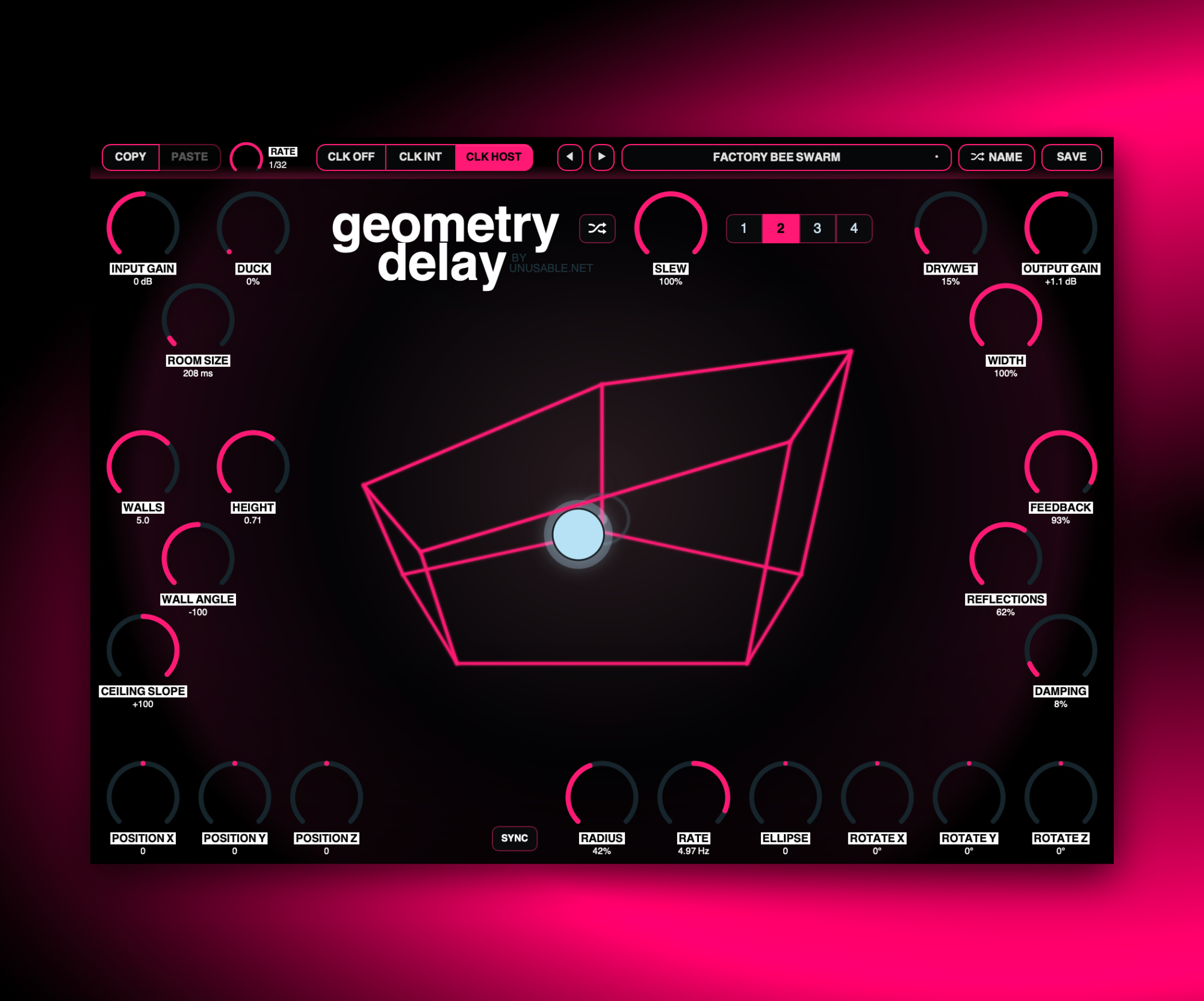
Geometry Delay is a multi-tap delay controlled through the abstraction of a room. Its walls, floor, and ceiling define related tap times, while the shared speaking-and-listening node changes their distances and can move through a three-dimensional orbit. This guide covers the signal path, room geometry, node movement, orbital modulation, slots, sequencing, and presets.

01

Signal path and echoes
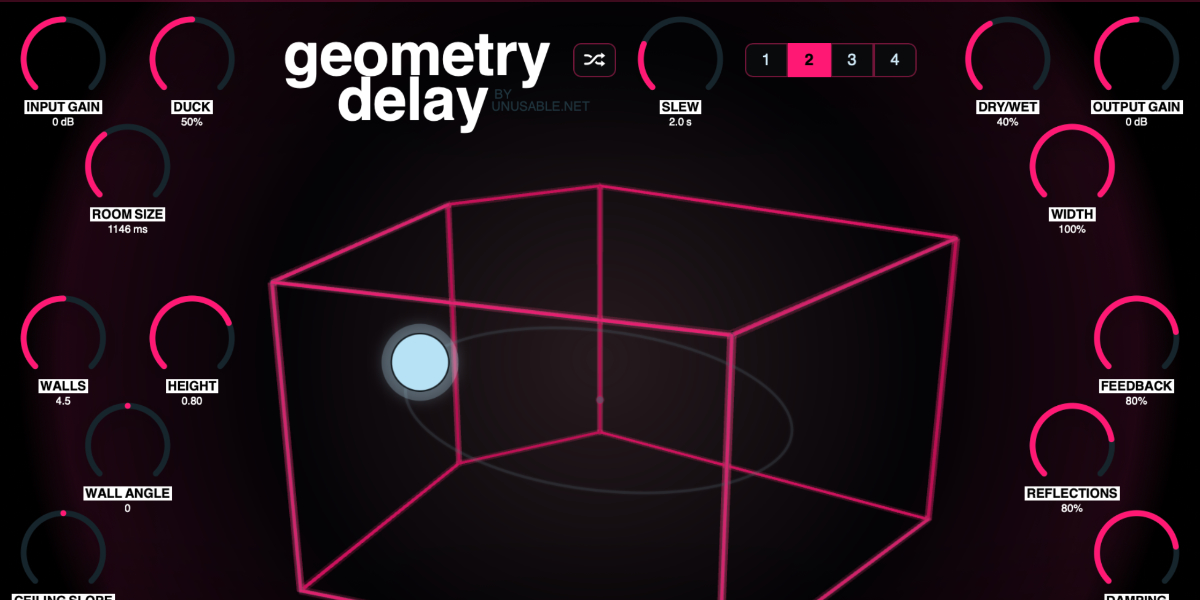
Geometry Delay input, output, width, feedback, reflections, damping, duck, and Dry Wet controls

The input feeds a set of independent delay paths. Each active wall is one tap, with separate floor and ceiling taps completing the room. The room is a control model rather than an acoustic simulation: a repeat represents the complete node-to-surface-to-node journey, and each tap recirculates through its own feedback loop.

Input Gain sets the level entering the delay. The center position is unity gain, with attenuation to the left and boost to the right.

Feedback sets the amount returned independently through every tap. Higher values create more repeats without mixing the taps into one shared feedback delay.

Reflections sets the audible level of the individual room taps. It changes how strongly the surfaces return sound, while Feedback controls how long those returns continue.

Damping darkens and slightly attenuates the repeated signal inside each feedback path. Higher values remove more high-frequency energy on successive repeats.

Width scales the stereo spread created by the tap positions.

Duck reduces the wet signal while new input is present, then lets the echoes rise as the input envelope falls.

Dry/Wet crossfades between the original input and the complete multi-tap output.

Output Gain sets the final plug-in level. The center position is unity gain, with attenuation or boost available around it.
02

Room geometry and tap times

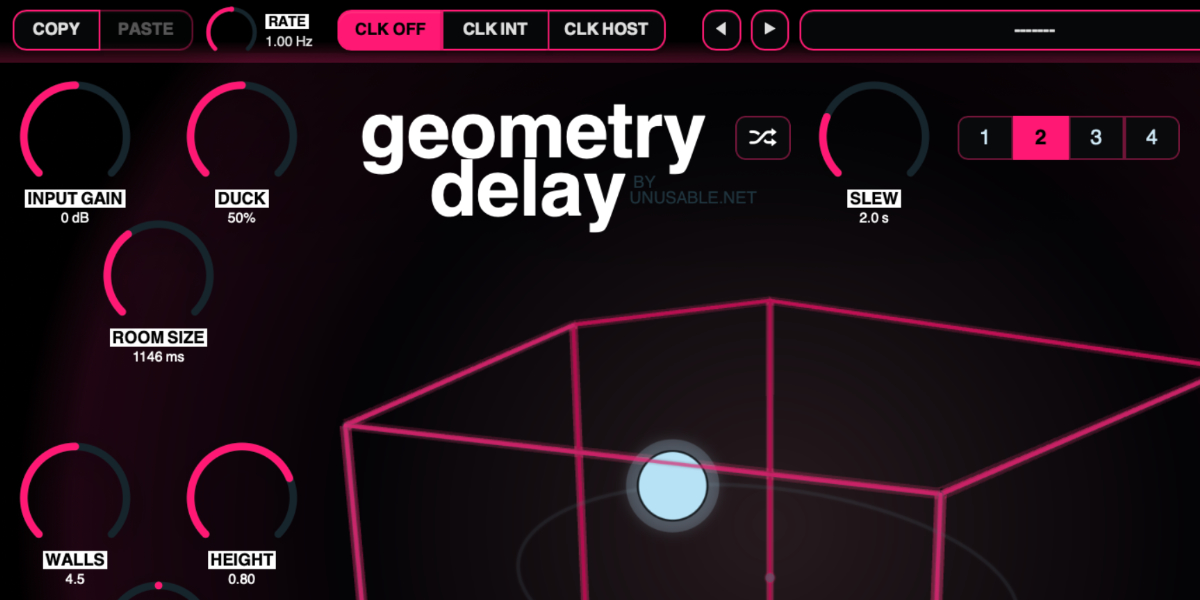
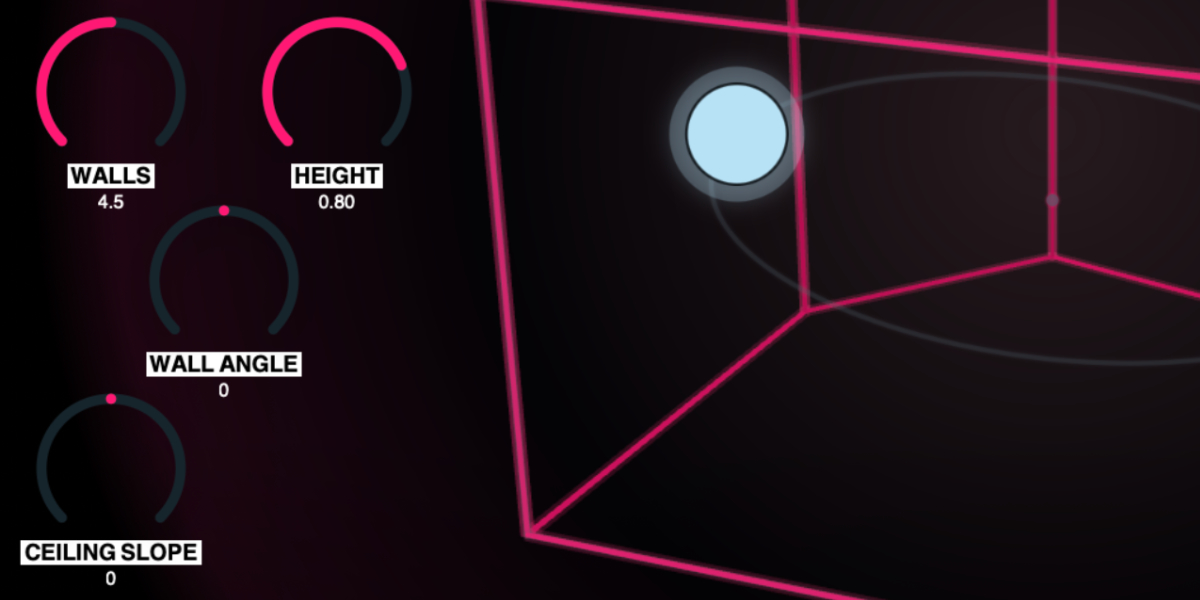
Geometry Delay room with Room Size, Walls, Height, Wall Angle, and Ceiling Slope controls

Geometry determines the timing and relationship of the taps. Moving one room control can therefore change several echoes at once while preserving a coherent spatial shape.

Room Size sets the overall time scale of the room from short, compact echoes to delays as long as three seconds.

Walls morphs continuously from a three-sided room through four, five, and six sides. Intermediate values fade the incoming wall into the delay rather than switching it abruptly.

Height sets the distance between floor and ceiling. It directly changes the floor and ceiling tap times and the space available for vertical node movement.

Wall Angle leans all walls toward or away from the room center. This changes wall distances and incidence angles, which alters both tap timing and level.

Ceiling Slope raises one side of the ceiling while lowering the other. It changes the ceiling distance across the room and therefore changes the ceiling tap as the node moves horizontally.

The pink outline shows the current control geometry. It is intended to make several related delay times quick to shape, not to reproduce real room acoustics or wall-to-wall reflections.

03

Node position and direct movement

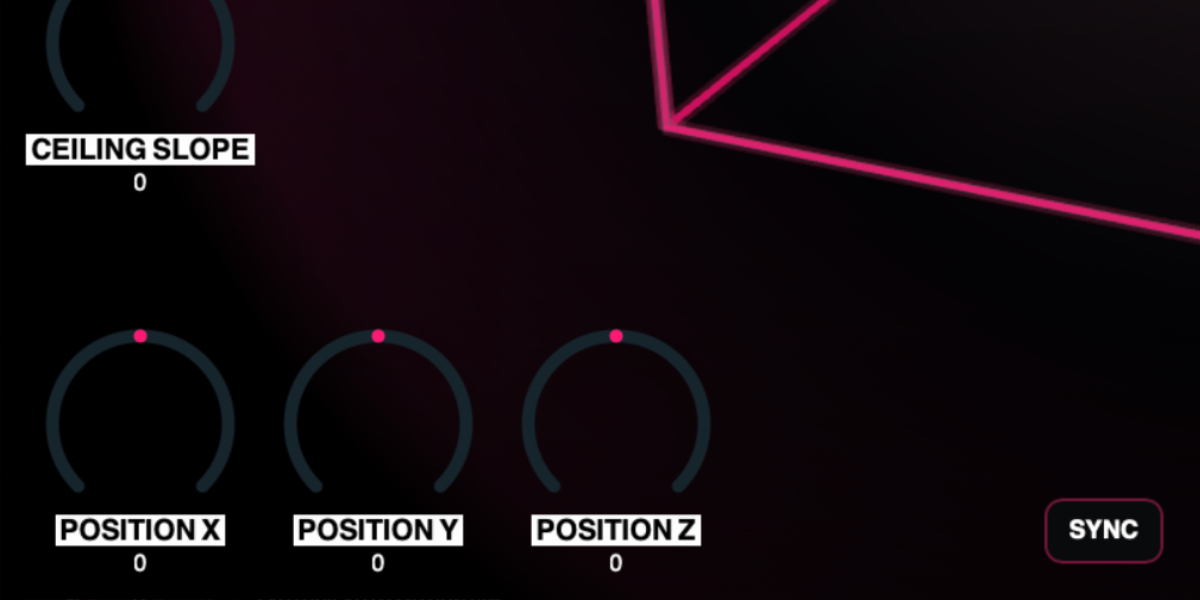
Geometry Delay speaking and listening node with Position X, Position Y, and Position Z controls

The blue node is both the sound source and listener. Moving it changes the round-trip distance to every surface: nearby taps become shorter, distant taps become longer, and continuous motion creates Doppler-like pitch movement.

Position X moves the node left and right and changes both tap timing and stereo relationships.

Position Y moves the node between floor and ceiling, changing the vertical tap distances.

Position Z moves the node through room depth, shortening the taps in one direction while lengthening those behind it.

The node remains constrained inside the current room even when geometry or orbital movement would otherwise place it beyond a surface.

Drag node or orbit
Move Position X and Position Y directly in the room.
Shift during drag
Switch seamlessly to Position X and Position Z movement while keeping the pointer held.
Wheel over node or orbit
Move Position Z without dragging.
Option/Alt-wheel
Make finer Position Z movements.
Shift-wheel
Make coarser Position Z movements.
04

Three-dimensional orbit

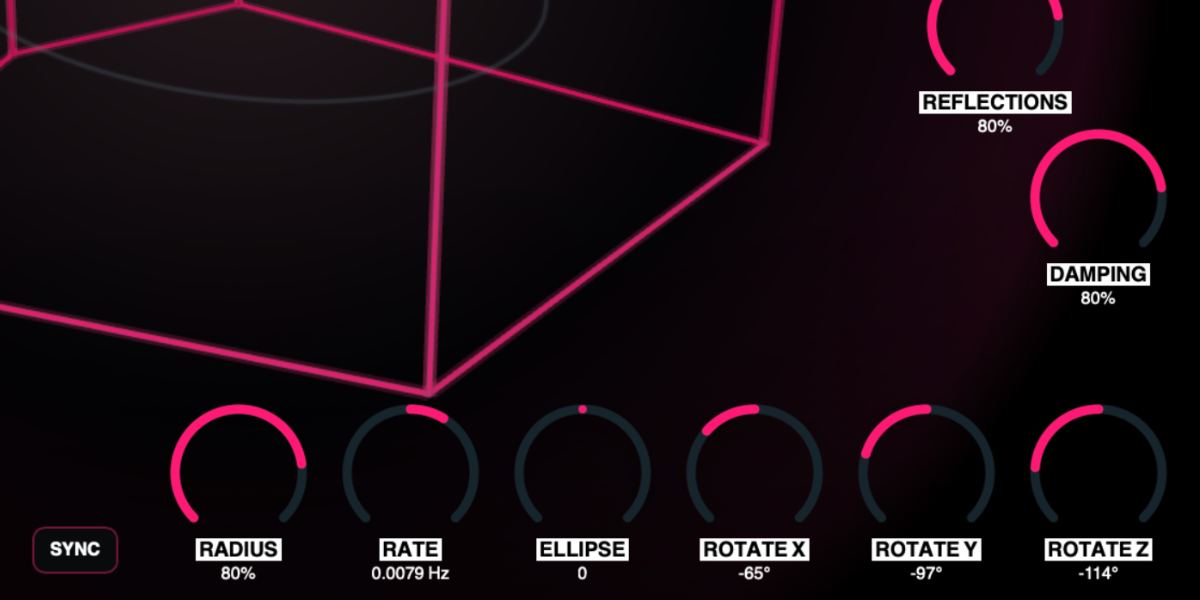
Geometry Delay Radius, Rate, Sync, Ellipse, and three orbit rotation controls

The orbital modulator moves the node around its stored center position. Small orbits create subtle delay-time modulation; larger paths produce obvious Doppler bends and more dramatic changes between the taps.

Radius sets orbit size with extra resolution near zero for fine delay-time modulation.

Rate sets free-running speed and direction. The center position stops motion; values on opposite sides reverse the orbit.

Sync changes Rate to host-clock divisions. Synced values describe one complete orbit, and transport from the project start restarts the phase.

Ellipse changes the relationship between the two orbit radii, from paths stretched on one axis through a circle to paths stretched on the other.

Rotate X / Y / Z rotate the orbit around the three room axes. Each control runs from -180 degrees through 0 at center to +180 degrees.

The full orbit guide remains visible even where it crosses a wall. Only the node is constrained, so it follows the intended path as closely as the room allows.

05

Slots, randomization, and sequencing

Geometry Delay Copy, Paste, Rate, clock controls, Slew, Random, and four slots

Four slots store the delay geometry, echo behavior, node position, and complete orbit state. Input Gain, Output Gain, Dry/Wet, Duck, and Slew remain global, so sequencing cannot create unwanted level or mix changes.

1-4 select a slot for editing. Any stored-parameter change automatically overwrites the active slot.

Copy / Paste copies or pastes the complete stored state. Pasting during a transition takes control immediately instead of waiting for the previous slew to finish.

Random rewrites the active slot with a new room, delay, position, and orbit state, then moves toward it using Slew.

CLK OFF stops automatic stepping. Manual slot selection and randomization still use Slew.

CLK INT advances through enabled slots from the internal Rate in Hz.

CLK HOST advances from the DAW transport and changes Rate to musical divisions.

Slew sets transition time with the clock off. In clocked modes it becomes a percentage of the current step.

Holding a parameter while sequencing writes only that parameter into every incoming slot. Its control stays under the gesture while all other stored values continue their own transitions.

Shift-click or double-click slot
Enable or disable the slot. At least one slot remains enabled.
Cmd/Ctrl-click slot
Preview and lock the slot without slew, pausing automatic sequencing until it is unlocked.
Cmd/Ctrl+C / Cmd/Ctrl+V
Copy or paste the active slot.
Cmd/Ctrl+Z
Undo the previous edit gesture.
Cmd/Ctrl+Shift+Z
Redo an undone gesture unless a new edit has cleared the redo history.
06

Presets and control shortcuts

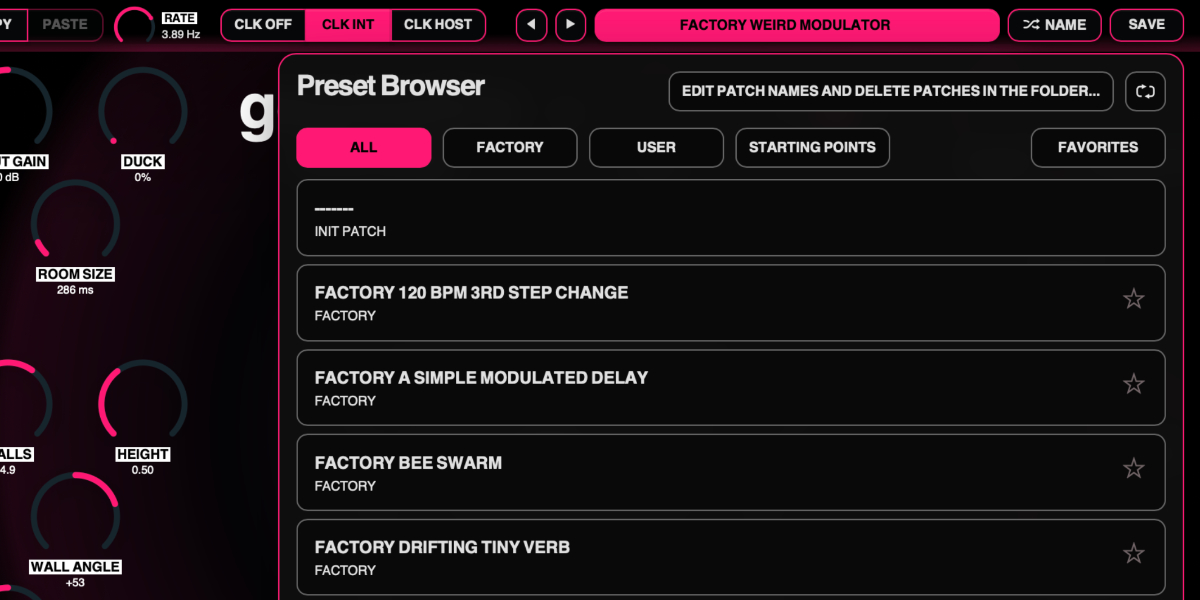
Geometry Delay preset navigation, name display, random name, and save controls

The preset name opens the browser. Presets store the complete plug-in state, including all four geometry slots, their enabled states, sequencer settings, global level controls, and orbital sync state.

Preset arrows step through available presets and wrap between the first and last entries.

Preset name opens the preset browser.

Name generates a preset name.

Save writes the complete state. Saving without first generating a name creates one automatically.

Factory / User / Starting Points / Favorites filter the preset browser.

Versioned Save writes a numbered copy when the current preset has changed.

Folder opens the preset directory for external renaming or deletion.

Refresh reloads externally renamed or deleted preset files.

Drag up / down
Increase or decrease a knob value with linear vertical movement.
Double-click control
Reset it to the initial value.
Cmd/Ctrl-click or Option/Alt-click control
Reset it to the initial value.
Wheel over control
Adjust without dragging.
Option/Alt-wheel
Fine adjustment.
Shift-wheel
Coarse adjustment.

Recommended for

  • Animated multi-tap echoes with built-in movement and drift
  • Pitch-bending transitions and breakdown effects
  • Wide delay textures that sit somewhere between echo, chorus, and controlled chaos

Fit and focus

Great fit for:

  • delay effects that moves in weird ways
  • spatial control models that stay quick to use
  • effects that are a bit surprising and sometimes a bit bonkers

Questions people ask

What is Geometry Delay?

It is a multi-tap delay where a simple room abstraction controls delay timing, tap layout, and node-driven motion.

How is it different from a normal delay?

It thinks in room shape first rather than individual tap values, so several echoes move together and the result gets interesting very quickly.

Who is it for?

It is for musicians and producers who want a creative delay that feels fast, tactile, and inspiring.

Compatibility

macOS 12+, Windows 10/11
macOS: AU/VST3, Windows: VST3

These plugins use detailed real-time processing and are happiest on reasonably recent CPUs, especially when several instances are running at once.

Slot sequencer

A shared walkthrough of the Unusable slot sequencer system, including how stored states, stepping, and slew can turn a static patch into motion.

Preset system

A shared walkthrough of the Unusable preset system, with practical tips for saving, naming, organizing, and moving between ideas.

Bundle option

Also available in bundle form

If this plugin fits your workflow, there is a good chance one of the bundles will fit even better and reduce total spend.

Full Suite v2

All unusable tools in one package, built to surprise, inspire, and keep the creative process moving.

€159.00€399.00incl. 25% VAT

Includes 14 products.