Unusable Engineering ApS
effect

Ensemble Diffuser

Dual-circuit modulation with stringer-style ensemble motion and hot vintage-inspired phasing.

ModulationAU/VST3Mac/Win

Slot Sequencer

  • Parameters held during sequencing now overwrite every slot passed during the gesture.
  • Added Cmd/Ctrl+click slot preview, which pauses sequencing and auditions the selected slot.

Shortcuts And History

  • Added slot copy and paste with Cmd/Ctrl+C and Cmd/Ctrl+V.
  • Added multi-step undo with Cmd/Ctrl+Z.
  • Added redo with Cmd/Ctrl+Shift+Z.

Interface Stability

  • Fixed controls occasionally remaining locked until the plugin window was reopened.
  • Improved synchronization between displayed control values, active slots, and the processing state.

DSP And Performance

  • Reduced repeated DSP calculations by precomputing filter and smoothing coefficients.
  • Refined ensemble modulation smoothing for more stable movement and reduced unwanted modulation artifacts.
  • Improved chorus filtering, phase smoothing, and DC stability.
  • Refined the phaser's lamp, LDR, op-amp coloration, and feedback-filtering behavior.
  • Improved BBD voice filtering and grit behavior.

What it is

Ensemble Diffuser combines two modulation circuits in one effect: a three-voice ensemble chorus and a musical multi-stage phaser. You can run them in parallel or in series, depending on whether you want width first or movement first.

The ensemble circuit gives orbiting width and gentle instability, while the phaser adds notch movement and harmonic sweep. Because each circuit can be blended and bypassed independently, you can dial subtle animation or commit to obvious swirl without losing control of level and placement.

It is useful on pads, synth keys, guitars, and clean leads that need body and motion. On bass-adjacent material, light settings add width and life without collapsing center focus.

Highlights

Triple-voice ensemble engine

Three independently moving voices create wide, floating modulation.

Expressive phaser circuit

Multi-stage phasing ranges from soft glue to pronounced moving notches.

Parallel or serial routing

Choose topology quickly to fit either subtle mix work or bold sound design.

Full walkthrough

A quick walkthrough of Ensemble Diffuser covering its functionality, the philosophy behind it, and showing it on various sound sources.

Slot sequencer

Ensemble Diffuser already sits in the space between width, chorus, and phaser, and the slot sequencer pushes it further away from being a static widener. By storing a few different modulation states, routing balances, and depth settings, you can make it behave more like a living classic modulation effect than a one-setting sweetener.

Because dry and wet are part of the sequenced state here, the movement can swell in and out rather than just wobbling the same amount forever. A slow sequence can gently reshape a pad or guitar over several bars, while shorter transitions can introduce the kind of modulation twists that usually take several plugins to set up.

Watch slot sequencer video
Reference

Quick user guide

Ensemble Diffuser combines a three-voice ensemble chorus and a multi-stage phaser that can run in parallel or either serial order. This guide covers both circuits, routing, randomization, the four stored slots, clocked movement, presets, and editing gestures.

01

Signal path and routing
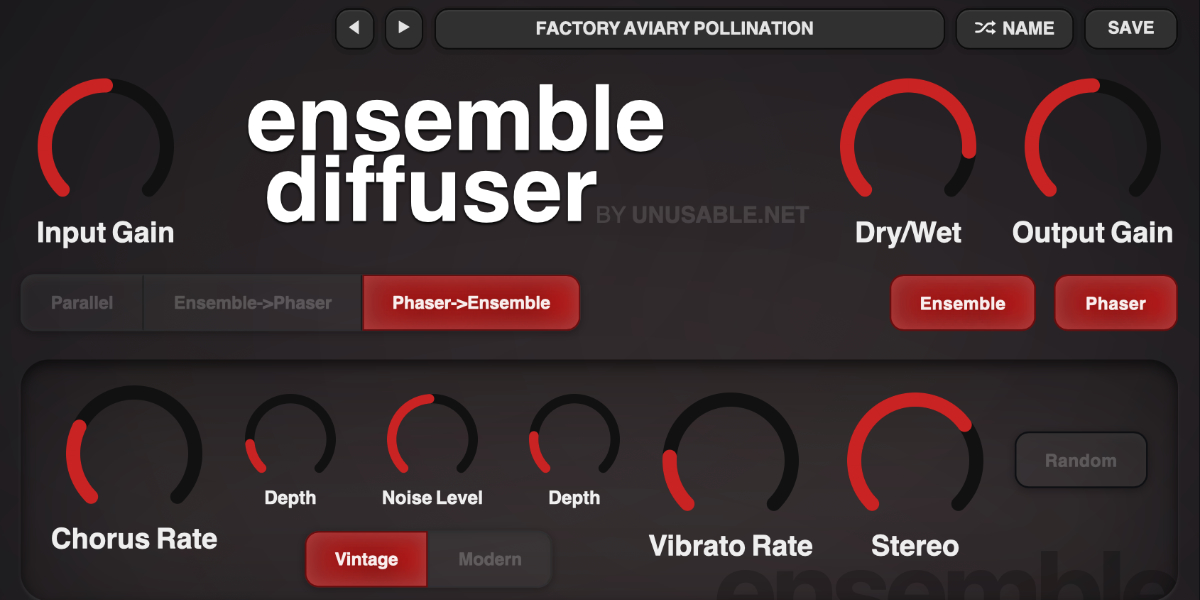
Ensemble Diffuser input, routing, circuit enable, Dry Wet, and output controls

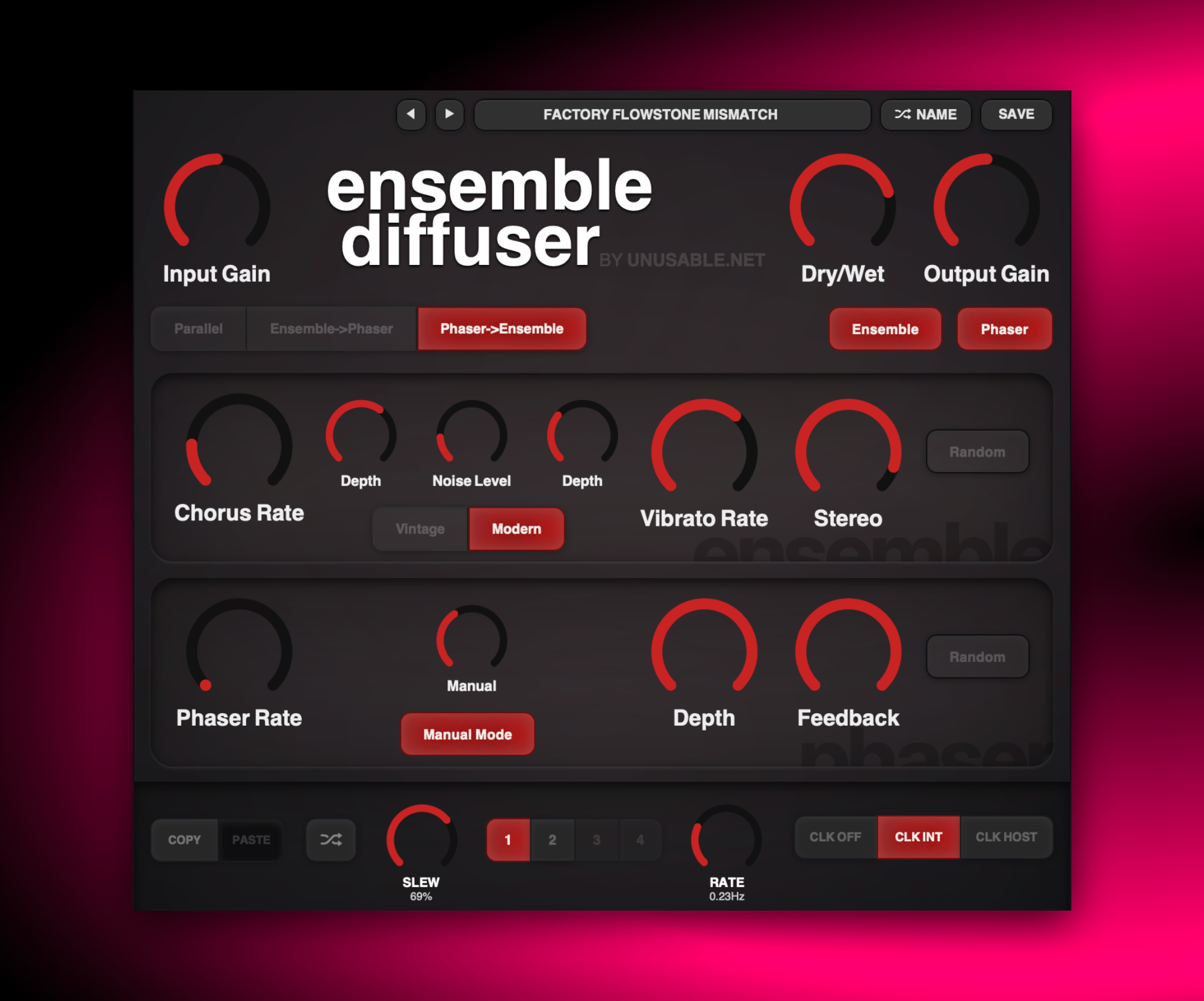
Input Gain feeds the selected circuit topology. The processed path is mixed with the original input at Dry/Wet and then passes through Output Gain.

Input Gain sets the level entering the effect circuits.

Parallel feeds the ensemble and phaser from the same input and combines their processed outputs.

Ensemble -> Phaser runs the ensemble output through the phaser.

Phaser -> Ensemble runs the phaser output through the ensemble.

Ensemble / Phaser enable or bypass the individual effect circuits.

Dry/Wet crossfades between the original input and the complete routed effect path.

Output Gain sets the final plug-in level.

Dry/Wet is stored in the four slots. Input Gain, Output Gain, routing, and the two circuit enable buttons remain global.
02

Ensemble circuit

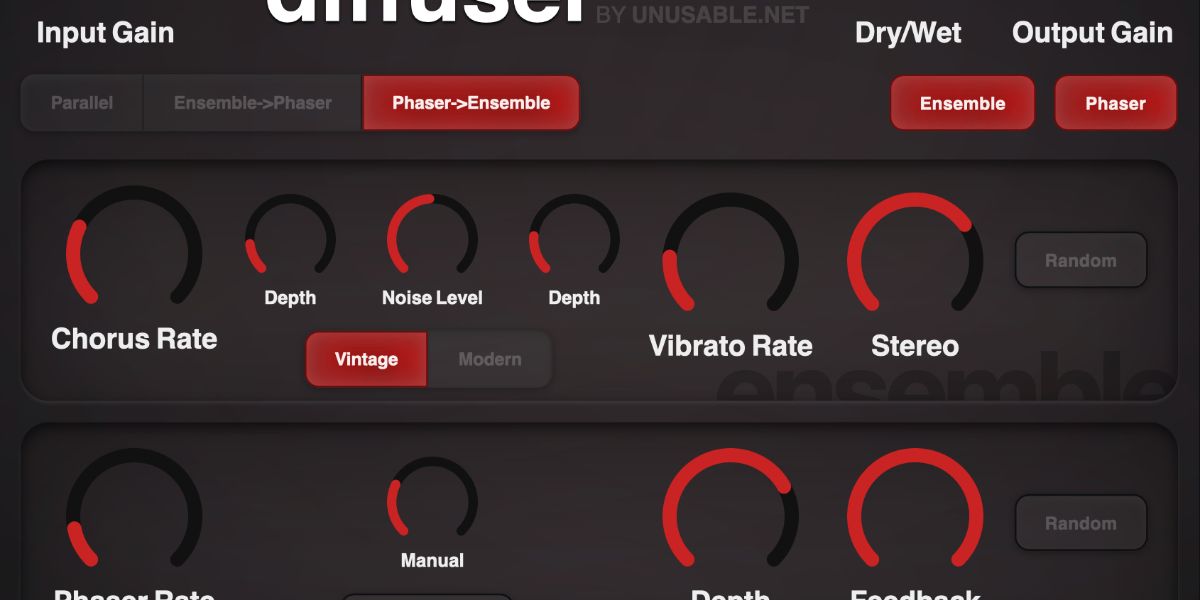
Ensemble Diffuser chorus, vibrato, phase mode, stereo, noise, and random controls

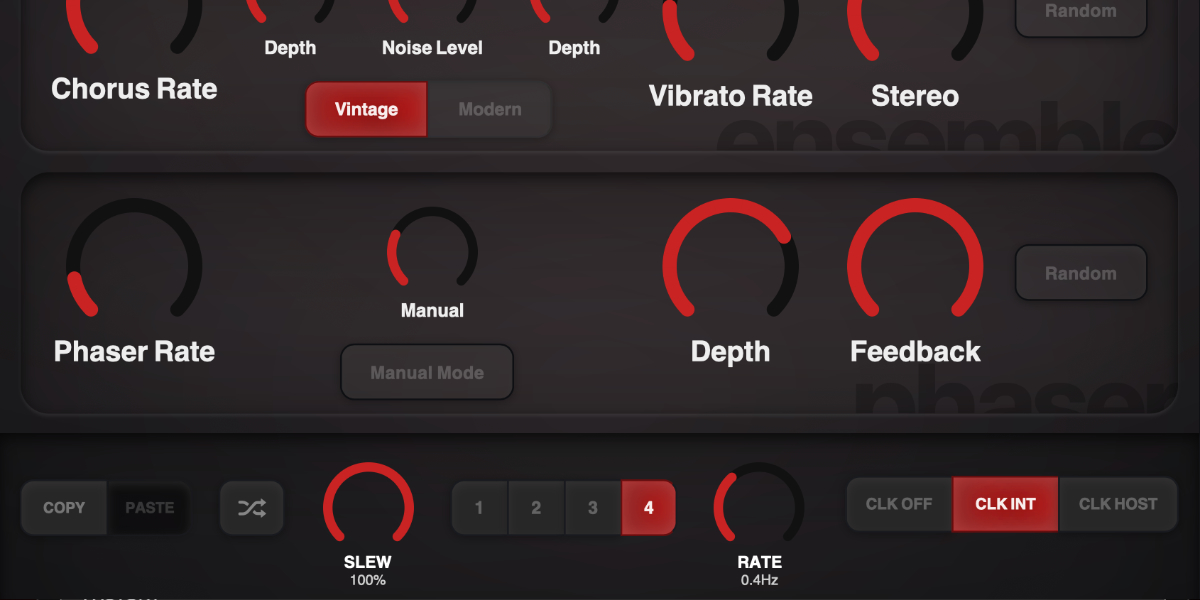
The ensemble uses three differently modulated delay voices to combine slow chorus movement, faster vibrato, stereo spread, and low-level circuit noise.

Chorus Rate sets the speed of the slow ensemble movement.

Chorus Depth sets the delay excursion created by the slow movement.

Vibrato Rate sets the speed of the faster pitch movement.

Vibrato Depth sets the amount of faster pitch movement added to each voice.

Stereo spreads the three voices from mono to a wider stereo image.

Noise Level sets the level of the filtered circuit-noise layer.

Vintage uses deliberately uneven, heavily slewed modulation phases for softer circuit-style movement.

Modern uses clean sine modulation with the three voices spaced evenly around the cycle.

Random randomizes the ensemble rates, depths, Stereo, Noise Level, and Vintage/Modern mode.

03

Phaser circuit

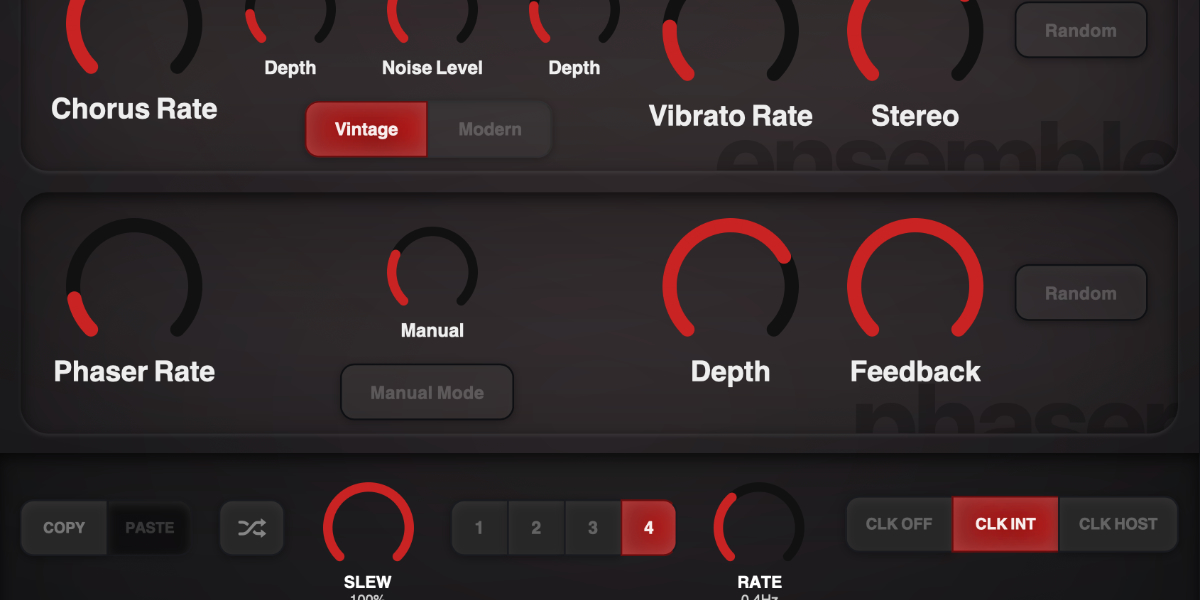
Ensemble Diffuser phaser rate, manual mode, depth, feedback, and random controls

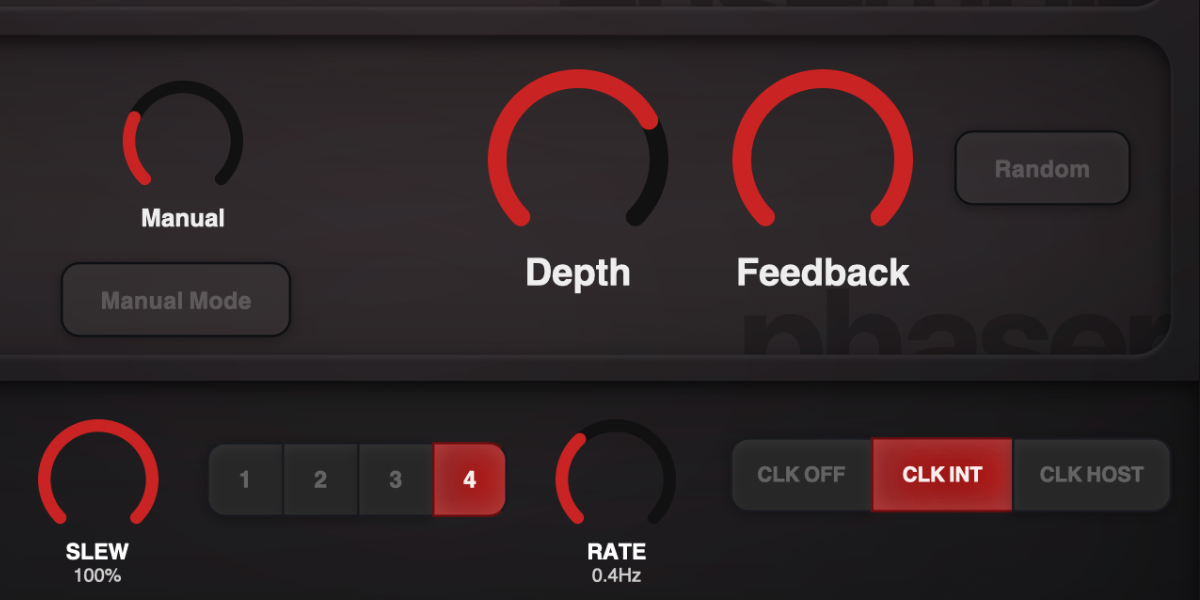
The phaser combines an automatic sweep, a manually selected center position, depth control, and regenerative feedback for movement ranging from subtle coloration to pronounced notches.

Phaser Rate sets the automatic sweep speed from slow movement to faster modulation.

Manual sets the phaser position used as the center of the sweep.

Manual Mode stops automatic movement so Manual directly sets the phaser position.

Depth sets how far the automatic phaser moves around the Manual position.

Feedback returns processed signal through the phaser to increase notch emphasis and resonance.

Random randomizes Rate, Manual Mode, Manual position, Depth, and Feedback.

Rate, Manual position, Depth, and Feedback are stored in slots. Manual Mode itself remains global.

04

Slots, randomization, copy, and paste

Ensemble Diffuser slot copy, paste, random, and four slot controls

Four slots store independent modulation states. A slot contains Dry/Wet, all six continuous ensemble controls, and the phaser Rate, Manual position, Depth, and Feedback.

1-4 selects a slot and shows its stored modulation values.

Copy / Paste copies or pastes the complete stored state of the selected slot.

Random randomizes every value stored in the selected slot.

Routing, Input Gain, Output Gain, circuit enables, Vintage/Modern, Manual Mode, and the two section Random buttons are not stored in slots.

Holding a stored parameter while sequencing writes only that parameter into every incoming slot. The held control does not jump, and unrelated values continue their own slew.

Shift-click or double-click slot
Enable or disable that slot. At least one slot always remains enabled.
Cmd/Ctrl-click slot
Preview and lock that slot, pause sequencing, and show a white inset outline.
Cmd/Ctrl+C / Cmd/Ctrl+V
Copy or paste the selected slot.
Cmd/Ctrl+Z
Undo the previous edit gesture.
Cmd/Ctrl+Shift+Z
Redo an undone gesture unless a new edit has cleared the redo history.
05

Slot sequencer

Ensemble Diffuser slew, rate, slots, and clock controls

The sequencer advances through enabled slots and interpolates each stored control independently. Clock source, Rate, and Slew determine when targets change and how the plug-in moves between them.

CLK OFF stops automatic stepping. Slots remain available for manual selection, and Slew still shapes transitions to selected or randomized states.

CLK INT runs continuously from the internal clock.

CLK HOST follows the DAW transport and changes Rate to a musical division.

Rate sets internal speed in Hz or the host-clock division, depending on clock mode.

Slew sets transition time with the clock off. In clocked modes it becomes a percentage of the current step duration.

Dragging a stored parameter temporarily takes control of only that parameter. Other controls continue moving toward their existing slot targets.

06

Presets and control shortcuts

Ensemble Diffuser preset navigation, name display, and save controls

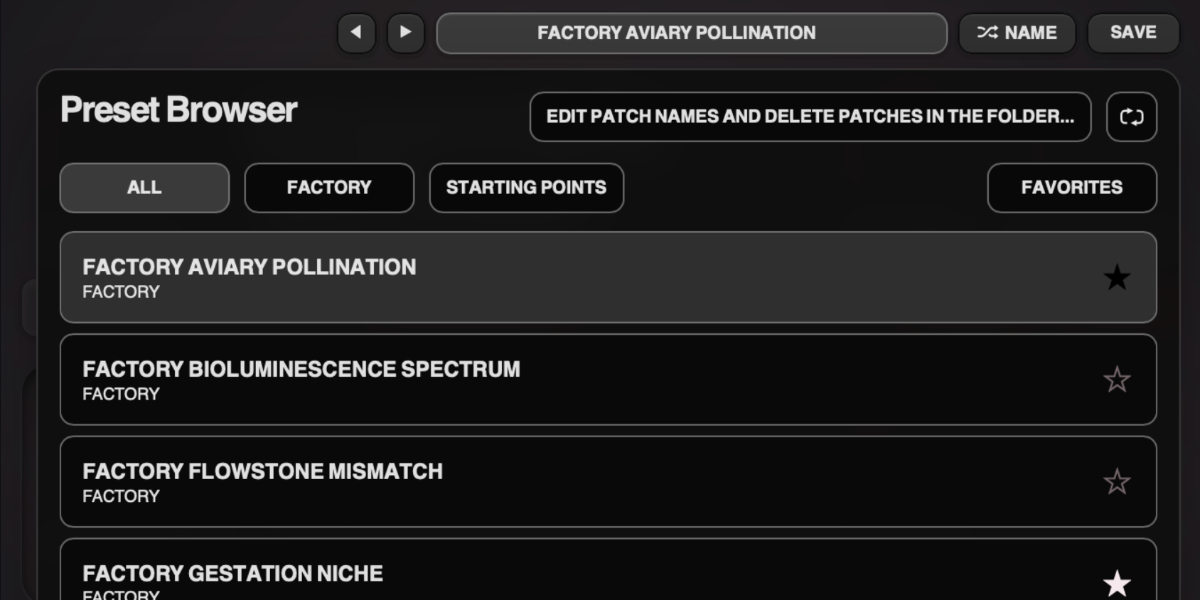
The preset name opens the browser. Presets store the complete plug-in state, including routing, circuit modes, all four slots, and sequencer settings.

Preset arrows step through available presets and wrap between the first and last entries.

Preset name opens the preset browser.

Name generates a preset name.

Save writes the complete state. Saving without first generating a name creates one automatically.

Factory / User / Starting Points / Favorites filter the preset browser.

Versioned Save writes a numbered copy when the current preset has changed.

Folder opens the preset directory for external renaming or deletion.

Refresh reloads externally renamed or deleted preset files.

Double-click control
Reset it to the initial value.
Cmd/Ctrl-click or Option/Alt-click control
Reset it to the initial value.
Wheel over control
Adjust without dragging.
Option/Alt-wheel
Fine adjustment.
Shift-wheel
Coarse adjustment.

Recommended for

  • Animated pad and chord movement
  • Vintage-style width on synth leads and keys
  • Motion layer on guitars and clean plucks

Fit and focus

Great fit for:

  • modulation with stereo depth
  • ensemble chorus textures
  • phaser movement that stays mixable

Questions people ask

What is Ensemble Diffuser?

It is a modulation plugin that pairs a three-voice ensemble section with a vintage-inspired phaser in a single workflow. With the slot sequencer, you can have it moving over time in ways that normal ensemble effects can't mimic.

How is it different from using separate chorus and phaser plugins?

The circuits are designed to complement each other directly, with shared gain and blend control and fast routing changes between parallel and serial behavior.

Who is it for?

Anyone who wants simplizity, lush motion and wide textures without building complex modulation chains every session.

What does it do to sound?

It is subtle most of the time.It adds depth, lateral movement, and harmonic sweep, making static sources feel wider and more animated.

Compatibility

macOS 12+, Windows 10/11
macOS: AU/VST3, Windows: VST3

These plugins use detailed real-time processing and are happiest on reasonably recent CPUs, especially when several instances are running at once.

Slot sequencer

A shared walkthrough of the Unusable slot sequencer system, including how stored states, stepping, and slew can turn a static patch into motion.

Preset system

A shared walkthrough of the Unusable preset system, with practical tips for saving, naming, organizing, and moving between ideas.

Bundle option

Also available in bundle form

If this plugin fits your workflow, there is a good chance one of the bundles will fit even better and reduce total spend.

Emulated Effects Pack

Five circuit-inspired effects for modulation, filtering, spring space, and controlled digital decay.

€59.00€145.00incl. 25% VAT

Includes 5 products.

Full Suite v2

All unusable tools in one package, built to surprise, inspire, and keep the creative process moving.

€159.00€399.00incl. 25% VAT

Includes 14 products.